One-click FPS boost
Apply proven performance tweaks across all nine categories, from GPU scheduling to power plans to service tuning, without opening regedit yourself.
Windows runs a lot of things you never asked for. EMTweaks puts a switch on 356 of them: services, telemetry, power settings, network defaults. Three switches are free. All 356 unlock for $29.99, paid once.
This is the interface, wired up. The three free switches really move the counter. Try one of the other 103 and it'll tell you which tier it's in and what that tier costs.
Free tier. Three switches work, the other 103 are one purchase away.
One click applies every optimization at once. Safe Only, or Everything.
Turns off window animations, fades and shadows for a snappier UI.
Sets MenuShowDelay to 0 for instant menu response.
Kills Acrylic/Mica blur to free GPU compositor cycles.
Removes the artificial startup app delay timer.
Unlocks and applies the hidden Ultimate Performance plan.
Keeps all CPU cores active to eliminate wake latency.
Stops USB ports powering down your mouse and keyboard.
Uninstalls Game Bar and disables background DVR capture.
Fully removes the Cortana package and its background host.
Uninstalls OneDrive and clears shell integration hooks.
Clears Clipchamp, Solitaire, Weather, News and friends.
Sets telemetry to Security level and stops DiagTrack.
Disables the per-user ad ID and tailored experiences.
Stops Windows recording and syncing your activity history.
Sets TcpAckFrequency=1 to cut packet coalescing delay.
Removes the 10-packet-per-ms multimedia throttle.
Sets autotuning to normal for balanced window scaling.
Reclaims the reserved 20% bandwidth for your traffic.
Applies Cloudflare 1.1.1.1 / Google as resolver pair.
Stops the NIC entering low-power states mid-match.
Clears stale entries and tunes cache retention.
Frees CPU by turning off the compression store.
Adjusts the paged pool / cache balance for desktops.
Recommended for NVMe drives to cut idle disk churn.
Requests a stable high-resolution scheduling timer.
Offloads frame scheduling to the GPU for lower latency.
Forces true exclusive fullscreen in games globally.
Switches the GPU to message-signalled interrupts.
Stops the preloading service. Ideal on SSD/NVMe.
Stops DiagTrack and the Connected User service.
Turn off if you never print. Closes an attack surface.
Halts background indexing; search becomes on-demand.
Closes remote registry access for a security win.
Background file transfer used by Windows Update.
Maintains NTFS links across the network. Rarely needed.
Removes vendor updaters from startup. Keeps Discord/Steam.
Boosts game launchers, throttles background updaters.
Auto-suspends UWP apps when they lose focus.
Uninstalls the MSN Weather app. Reversible from the Store.
Uninstalls Microsoft News. Reversible from the Store.
Uninstalls the Microsoft Solitaire bundle.
Uninstalls the Clipchamp video editor.
Uninstalls the Windows Get Help app.
Uninstalls Windows Maps.
Uninstalls Microsoft To Do.
Prioritises the foreground game for CPU/GPU resources.
Pins your games to the high-performance GPU preference.
Kills Game DVR's constant capture buffer.
Removes pointer acceleration and tunes polling handling.
Walks you through enabling ReBAR for GPU throughput.
Applies your rated memory speed and timings.
Reduces idle-to-load transition latency on desktops.
The demo shows you what's in the library. This is the short version of what EMTweaks actually does to your gaming performance.
Apply proven performance tweaks across all nine categories, from GPU scheduling to power plans to service tuning, without opening regedit yourself.
Live CPU, GPU and RAM usage plus temperatures, read straight from your hardware. The numbers match Task Manager because they come from the same place.
Strip out background bloatware, telemetry and idle services that eat CPU and RAM while you game. Fewer processes competing for your hardware means fewer stutters. Every removal flips back.
Ten changes to how Windows handles your mouse, keyboard and CPU scheduling. Smaller input buffers, no CPU held back for background media, cores kept awake instead of parked. Included with EMTweaks Plus.
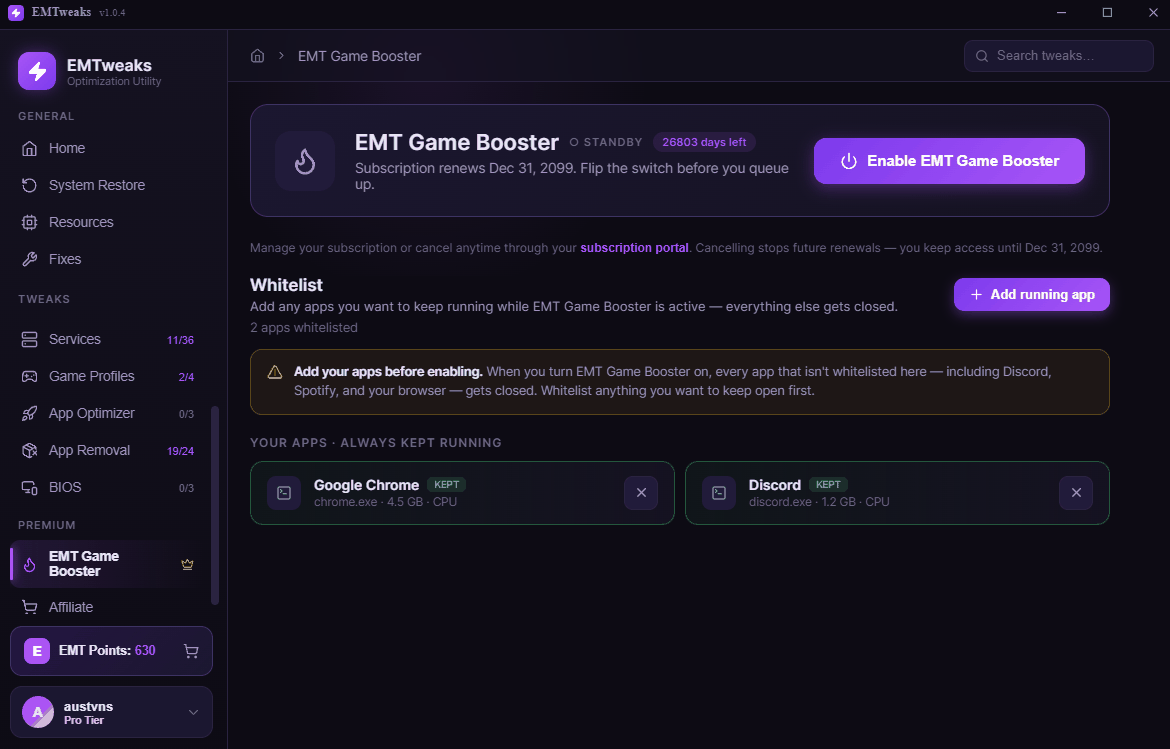
Closes background apps with one switch before you queue up, with a whitelist for whatever you want kept running. Reopen them whenever you are done. Free to try with one app.
Make a restore point before you tweak, confirm anything caution-flagged, revert instantly. Nothing here is one-way.
One click drops a game to competitive low settings through the NVIDIA driver, so player models pop and your frames climb. Fortnite and Marvel Rivals supported, more on the way. Revert just as fast. Pro, NVIDIA cards.
Build your own crosshair and draw it over any game. Stack layers, pick the shape, size, color and position, then save the ones you like. Two presets free, full designer on Pro.
Settings guides for Xbox and PlayStation, for the games where your console is the bottleneck rather than your PC. Sold separately from the tiers.
Most of what people call lag is not a high ping, it is an unsteady one. The stabilizer changes how Windows times and batches your packets, and shows you a live jitter graph so you can watch it settle. It does not lower your ping, nothing on your PC can do that, but it takes the spikes out. Included with EMTweaks Plus.
Each tier includes everything under it. Tiers aren't a subscription, and when tweaks get added later you don't pay again for them.
Three working General tweaks, the full live monitor, and EMT Game Booster with one app whitelisted. No card and no expiry, and the locked tweaks stay visible so you can see what you'd be buying.
Finishes the General category. Everything the free three leave behind.
Get BasicAdds Debloating and Networking. Strip Windows back and steady your ping.
Get StandardServices, App Optimizer, App Removal and all the low-level tuning.
Get AdvancedEvery category, plus Game Profiles, BIOS and every tweak added from here on.
Get ProEverything above, plus the tools that run while you play. Every tweak, the Input Delay Reducer, the Ping Stabilizer, and EMT Game Booster included. Access lasts while the subscription is active, so if you would rather own it outright, buy a tier instead.
Only one of these trips people up, and it's step three, so it's worth reading before you buy anything.
Grab the free app and run it as administrator so it can apply system-level changes safely.
Sign up inside the app with your email. Remember which email you use, the next step depends on it.
Purchase any tier or EMT Game Booster using the same email as your app account. That's the only thing linking the two.
Your tier activates automatically. No codes, no waiting. Hit “Refresh status” in the app if it hasn't caught up yet.
The app is Windows only. For PlayStation and Xbox there are written optimization guides instead, covering every setting that cuts input delay with the exact menu path to find it.
A complete PS4 and PS5 optimization guide as a PDF: 120Hz and VRR display setup, TV Game Mode, DualSense configuration for lower input lag, audio, DNS and network settings for lower ping, and system settings. Step by step with exact menu paths. No technical knowledge needed.
View on storeA complete Xbox Series X and S optimization guide as a PDF: 120Hz and VRR display setup, TV Game Mode, controller deadzone and sensitivity, audio, DNS and network settings for lower ping, and system settings. Step by step with exact menu paths. No technical knowledge needed.
View on storeThe one part that isn't a one-time buy, because it runs while you play instead of changing a setting once. Free to try with one whitelisted app.
Pick what stays running. Hit the switch before you queue up and EMT Game Booster closes the rest, handing that memory and CPU back to your game. Reopen them whenever you're done. Free to try, keep one app whitelisted at no cost.
The usual reason to leave the registry alone is that a bad edit sticks. Here every switch has an off position, and there's a restore point button before you start.
Turn something off, hate it, turn it back on. It writes back the value that was there before, not a guess at it.
You never guess. Anything with a real trade-off is flagged and asks you to confirm before it runs.
The only things it edits are Windows settings: services, registry values, power plans. It never opens a game file or reads game memory, which is what anti-cheat actually watches for.
No. EMTweaks only changes Windows settings: services, registry values, power plans, background apps. It never touches game files, game memory, or anything an anti-cheat looks at.
Every change is reversible and caution-flagged tweaks ask you to confirm. Make a restore point from inside the app first and you have a full rollback either way.
No. The app is free, includes three working General tweaks and full live monitoring, and shows you the whole library so you know what a tier buys.
EMTweaks is code signed, so most people never see this now. If your browser hesitates, open your downloads and choose Keep. If Windows shows a blue box, click More info then Run anyway. Both are about how many people have downloaded a file, not about what is in it. Ask in the Discord if you would rather check with someone first.
It applies real, documented Windows performance changes, so expect a steadier frame rate and fewer stutters rather than one magic number. How much you gain depends on your hardware and how much is already running: a bloated laptop has far more to reclaim than a clean desktop.
No. The tweaks change Windows settings directly, so once applied they stay applied whether EMTweaks is running or not. EMT Game Booster is the exception, since it manages your background apps live while you play.
The app updates itself. New tweaks and fixes arrive automatically, and anything added after you buy is included in the tier you already own.
Yes, and on Windows 10. EMTweaks is built for both, and it runs with administrator rights so it can reach the system-level settings most PC optimization tools never touch.
Yes. Message us on Discord and we'll credit what you already paid toward the higher tier. Any tweak added after you buy is included, so you never re-purchase.
Support runs through the Discord, and it's also where people post what actually changed on their machine. You don't need to have bought anything to join.
Run it as administrator, open the General tab, and you'll have three tweaks applied inside a minute. Decide about the rest after.
Download for Windows